Files are read locally for review. Only an authorized Super Admin may explicitly save a private pilot record; nothing is published automatically. OCR results must be compared with the official result evidence. / ගොනු මෙම උපකරණය තුළ පමණක් පරීක්ෂා කෙරේ. කිසිදු තොරතුරක් යවනු හෝ ගබඩා කරනු නොලැබේ.
1. Upload result evidence / ප්රතිඵල ලේඛනය ඉදිරිපත් කරන්න
doenets.lk වෙබ් අඩවියෙන් සෘජුවම බාගත කළ මුල් ප්රතිඵල PDF ලේඛනය පමණක් උඩුගත කරන්න. PDF ලේඛනය බාගත කරගත නොහැකි වේ නම්, එම ප්රතිඵල ලේඛනයේම සංස්කරණය නොකළ පැහැදිලි screenshots 1ක් හෝ 2ක් උඩුගත කරන්න. එය ලබාගත හැකි ස්ථානය උදාහරණ ඡායාරූපයකින් පහත දක්වා ඇත.
Upload only the original results PDF downloaded directly from doenets.lk. If you cannot download that PDF, upload one or two clear, unedited screenshots of the official results page. The picture below shows where to access the results.
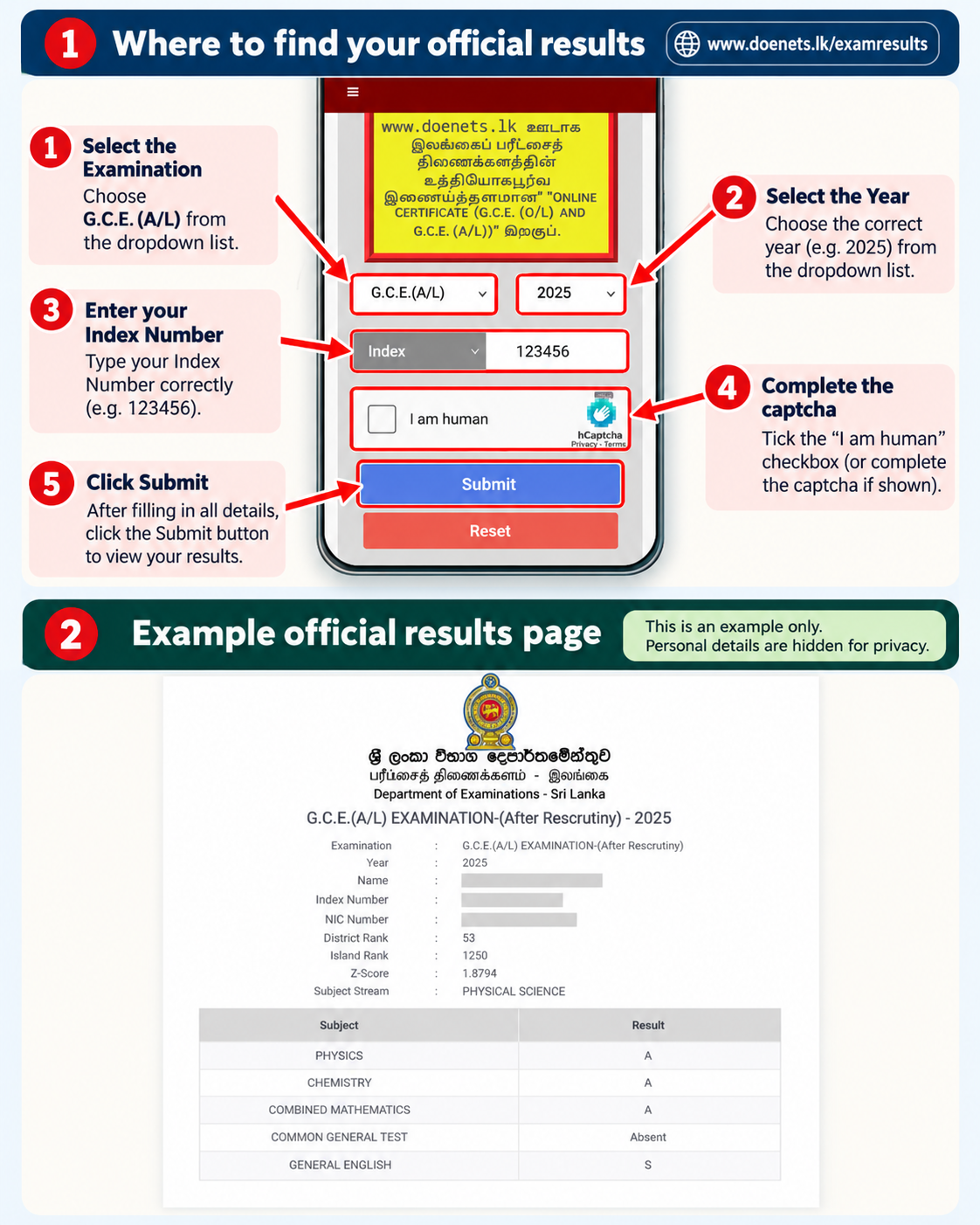
Both selections are retained separately. Choose screenshot 2 without losing screenshot 1. If only one screenshot is needed, leave the second field empty. / සියලු තොරතුරු නොපෙනේ නම් දෙවන screenshot එකද ඇතුළත් කරන්න.
2. Review and complete missing details / අඩු තොරතුරු සම්පූර්ණ කරන්න
Combined Mathematics and Physics are compulsory. Enter Chemistry OR ICT as the third subject. Once one is entered, the other is no longer highlighted. Only missing or uncertain fields need your attention. Automatically recognized fields are locked. Only missing fields are editable; check manually completed fields against your official result. To correct a recognition error, replace or re-read the original evidence. / අඩු හෝ අපැහැදිලි තොරතුරු පමණක් සම්පූර්ණ කරන්න.
Read your PDF or screenshots, complete the yellow fields, then select Continue to Review.
3. Student-provided details / සිසුන් සපයන විස්තර
At final launch, a one-use SMS code will verify this mobile number. Codes expire within 10 minutes, and repeated wrong attempts will be blocked. WhatsApp may use a different number.
OTP sending is not active in this preview. No SMS will be sent.⚠ IMPORTANT — Genuine results only / වැදගත් අවවාදය
Submit only your own genuine G.C.E. A/L results. Fake information, altered evidence or another student's results are prohibited.
Official results PDF or screenshots are mandatory. Suspicious submissions may be rejected and reviewed. OTP confirms control of a phone number, not ownership of exam results.
Verification rules / සත්යාපන නීති
Important verification rules
OCR is imperfect. Students must verify values against their original evidence. Unissued ranks must be explicitly marked “Not Issued”, not invented. Screenshots from different students must not be merged. Real submissions will require identity checking, same-exam evidence checks, Super Admin-selected year, unique year + index number, private storage and verified evidence.
Submission service status / ඉදිරිපත් කිරීමේ තත්ත්වය
Submission gateway status
Checking secure submission service…
- Server-side bot verification
- Server-verified OTP
- Private evidence storage and independent verification
- Authorized intake window
- Trusted submission gateway
- Staff review and publication controls
The student registration-free submission service remains disabled until the protection and end-to-end tests are complete.